You can log your own support tickets at any time using NSD Self Service. This method gives the fastest response time. You can check the status of your tickets without having to ring the National Service Desk (NSD).
Use NSD Self Service to:
- request IT services
- log faults and incidents
- get information to resolve IT issues
Accessing NSD Self Service
Access NSD Self Service here or click on the Ivanti self-service icon on your desktop.
Your username is the same as you use to log onto your PC. You do not need a password.
When you log on to the HSE network click on the self-service icon and it will bring you into the portal.
Devices you can use
You can use any device that you use to access the HSE network to access NSD Self Service. This includes HSE mobile phones, desktop computers, laptops and tablets. You cannot use your personal devices to access NSD Self Service.
Why you should use NSD Self Service
You should use NSD Self Service because:
- saves time, avoiding long phone wait times
- allows line managers to digitally sign and approve e-forms
- improved service levels
- convenience and availability - log your own calls at any time
- reduced paper forms and administration
- view and track the progress of existing calls
- add a note or request updates to your calls
- log incidents or requests on behalf of a work colleague
- real-time access to national and regional service disruptions
Username not yet registered for NSD Self Service
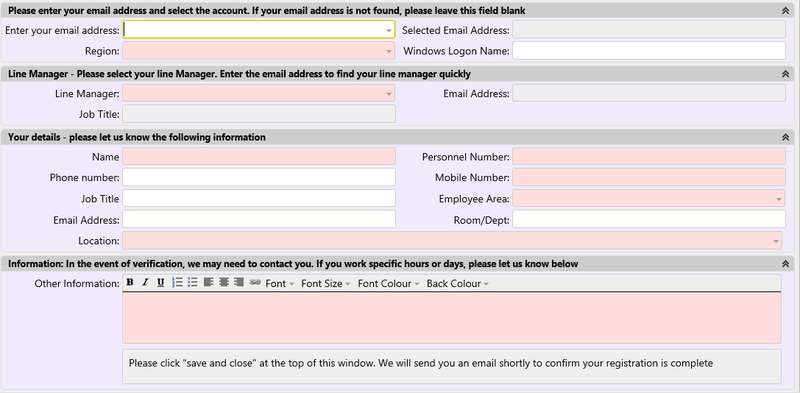
You may see the screen below when trying to access NSD Self Service. This is because your windows login ID is not yet registered for Self Service. Complete the e-form and click 'submit'. This will log a call to the service desk to complete your registration. Once this is complete you will have access to Self Service.
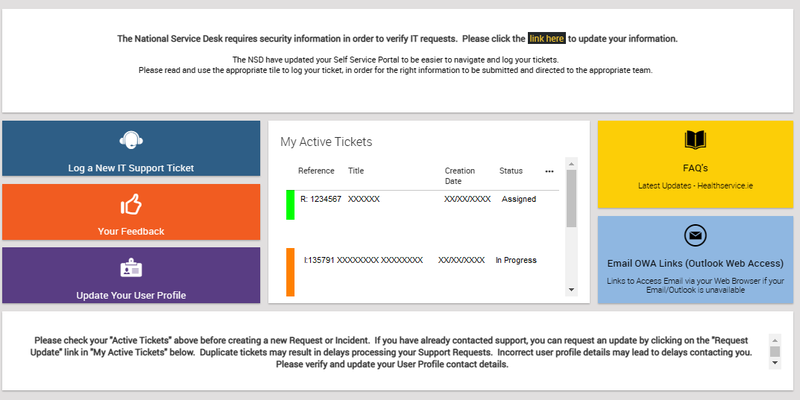
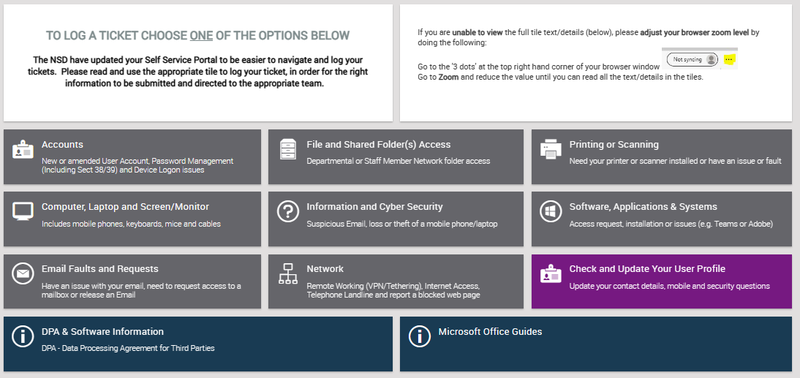
What NSD Self Service looks like
Contact the National Service Desk (NSD)
Use the NSD Self Service Portal or phone 0818 300 300